
Example Prompts
Once your AI-powered tool is connected to the Saner API Docs MCP Server, it can read the Saner API and SDK documentation through structured MCP tools. This lets it discover APIs, inspect parameters, explain SDK behaviour, and generate working automation scripts, all from natural-language prompts.
The examples below move from simple lookups to complete generated scripts.
Note:The Saner API Docs MCP Server is read-only. It supplies the specifications your AI-powered tool writes code from, and never calls the Saner API itself.
The scripts on this page run against your live Saner tenant when you run them. Several of them create organizations, accounts, and other real objects. Review generated code before running it, and use a test account while you are experimenting.
Discover Which APIs Are Available
Instead of manually browsing documentation, ask your AI-powered tool what exists.
Show APIs related to vulnerability management in Saner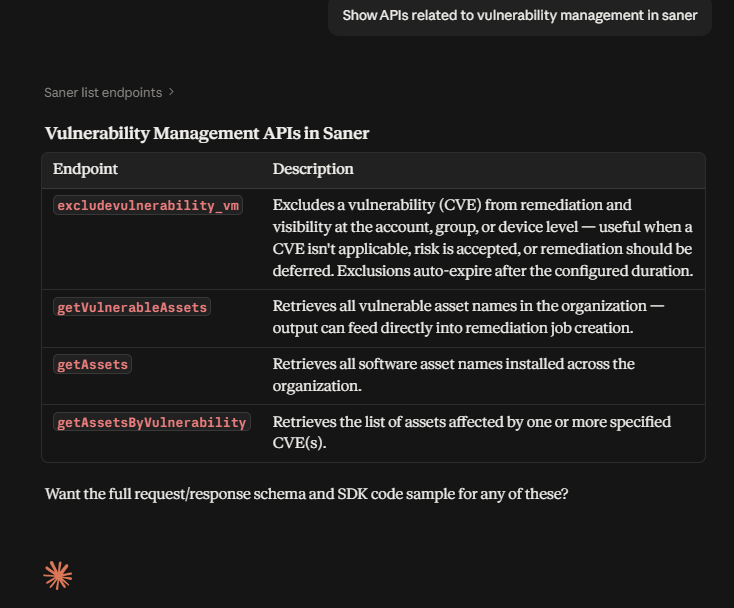
Understand How to Perform a Task
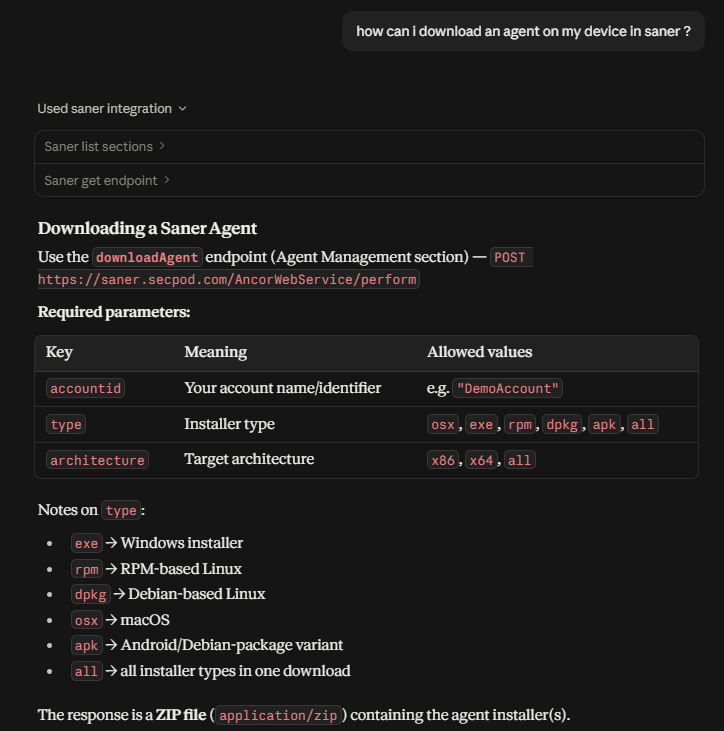
Ask how to do something, and your AI-powered tool works out which APIs are involved.
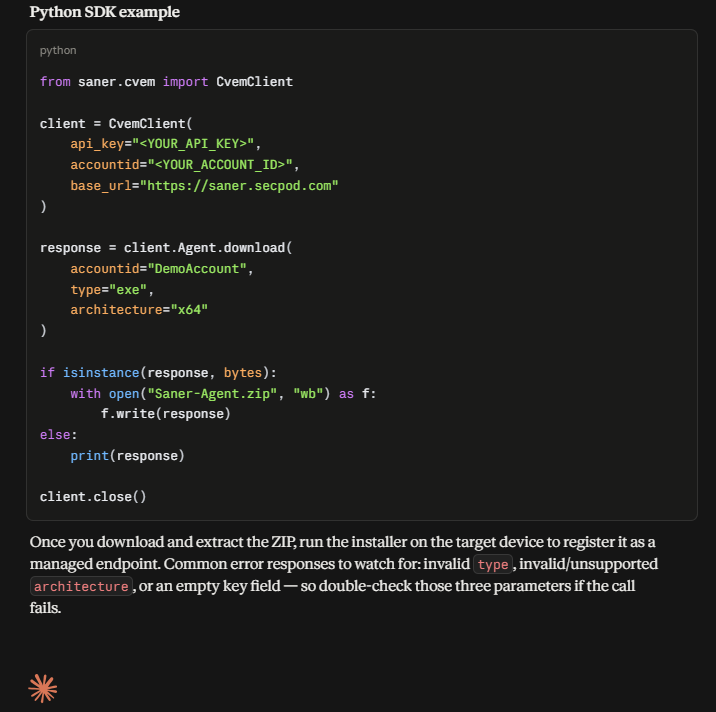
How can I download an agent on my device in Saner?Behind the scenes, the AI-powered tool uses the MCP server to search for relevant APIs, retrieve their details, read the parameter requirements, and assemble an SDK-ready example. A typical response covers the API description, required and optional parameters, a Python SDK example, the request payload structure, and the response format.
You can also ask for a reference-style explanation rather than a how-to:
Explain agent download options in Saner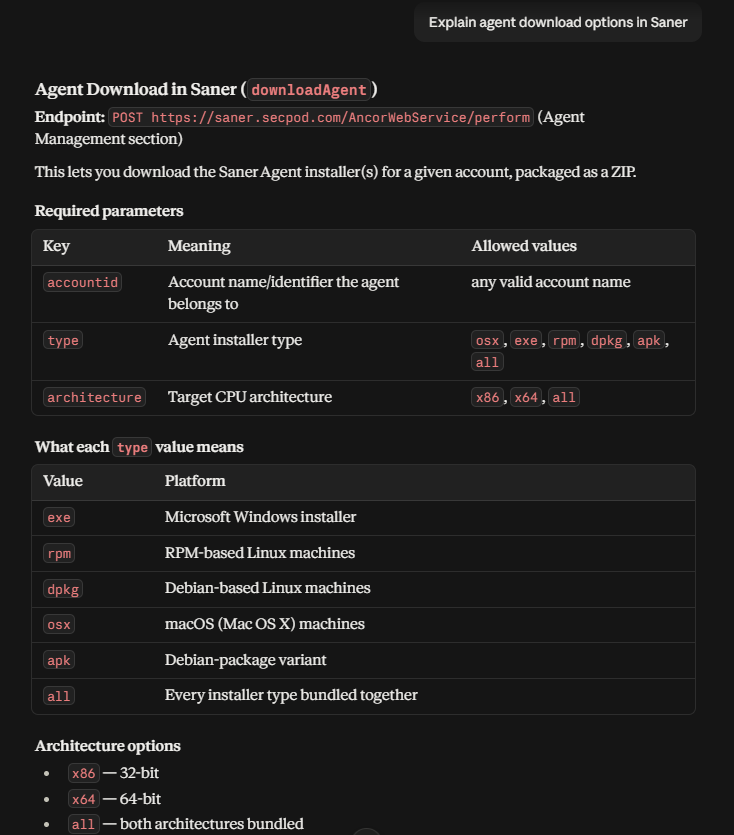
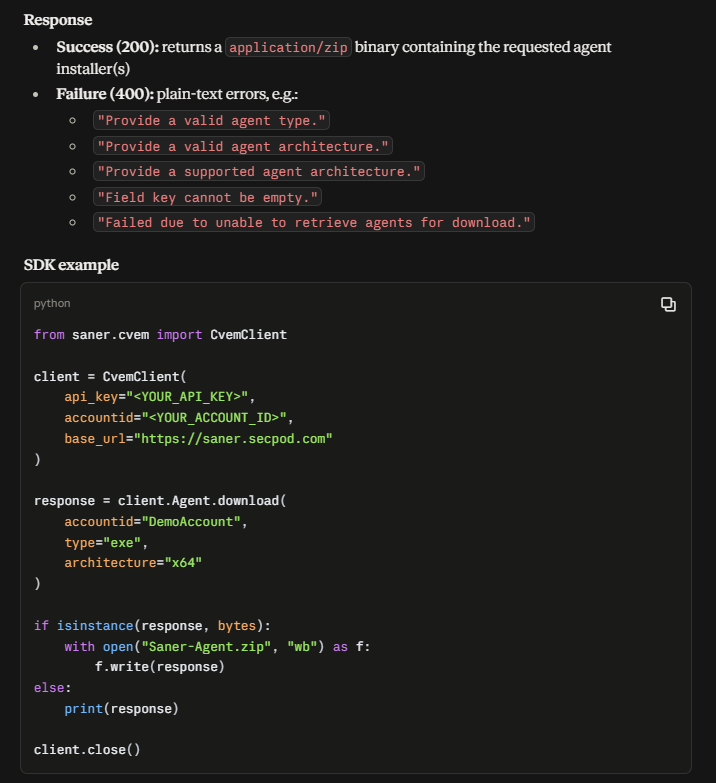
Inspect Request Parameters
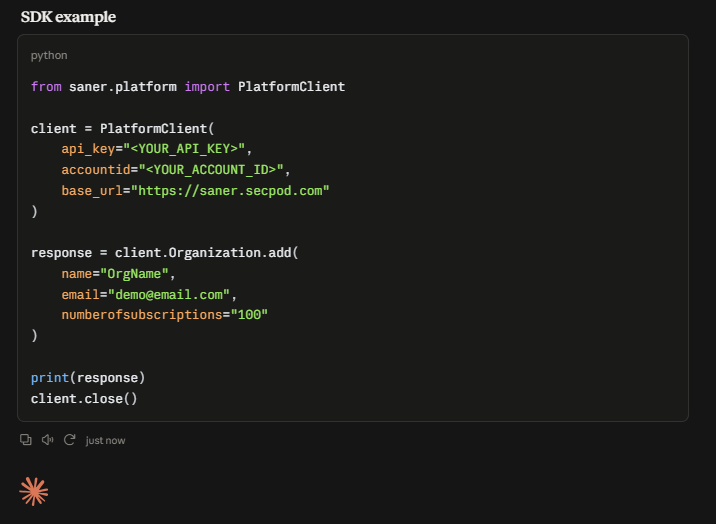
To understand what a specific API expects before you write anything:
What parameters are required for adding an organization in Saner?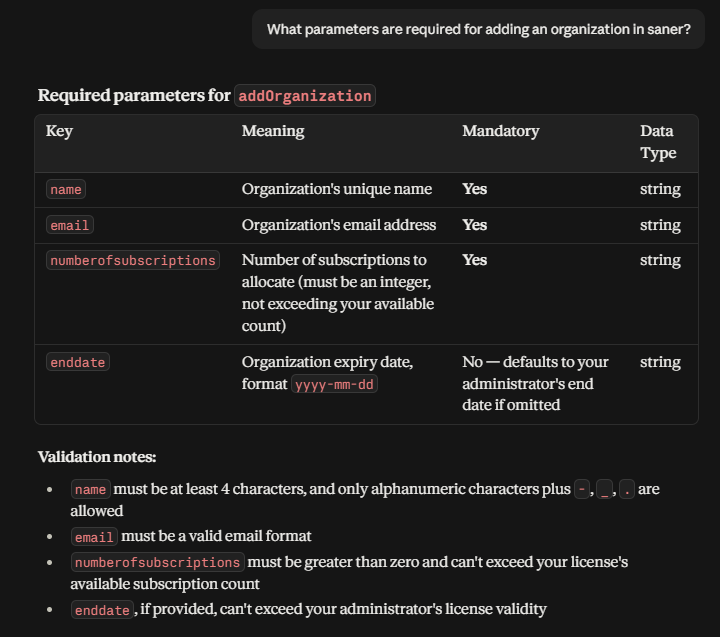
Ask About SDK Behaviour
The server serves SDK documentation as well as API specifications, so your AI-powered tool can answer questions about how the SDK itself works, not just which APIs exist.
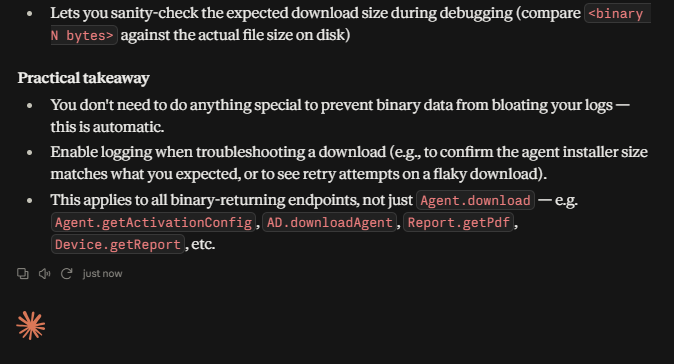
How will logs be handled in the SDK when downloading binary files?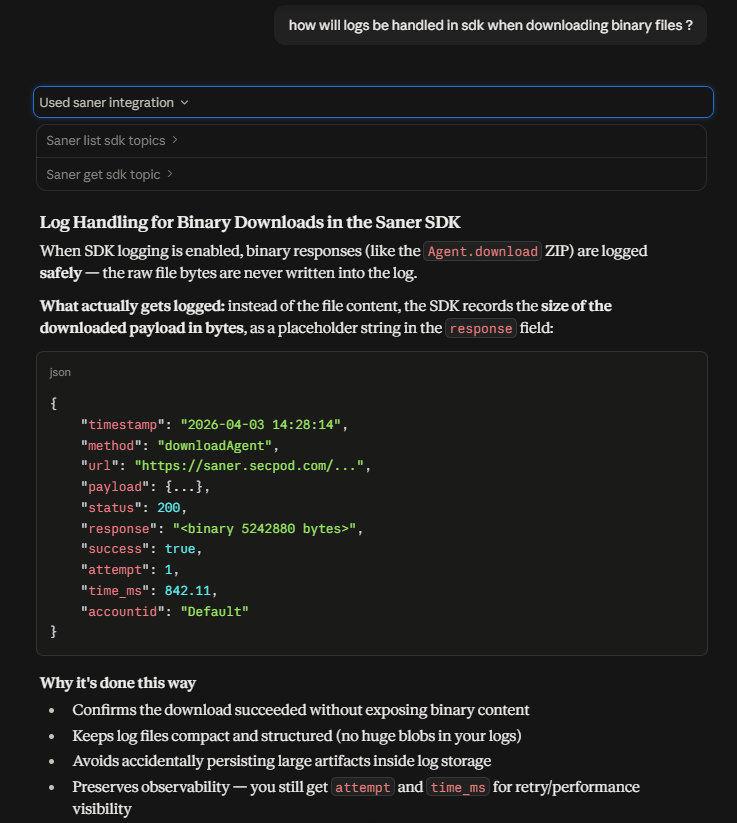
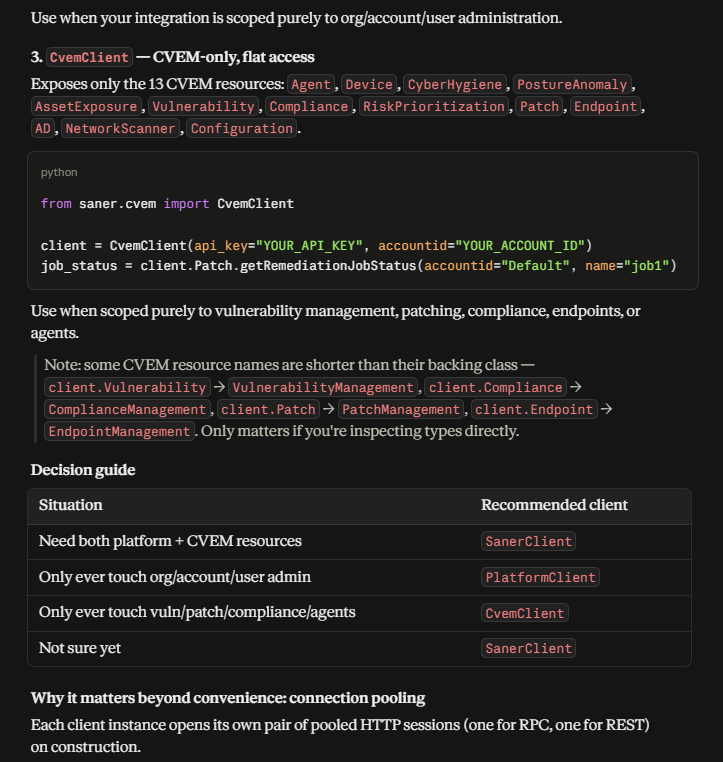
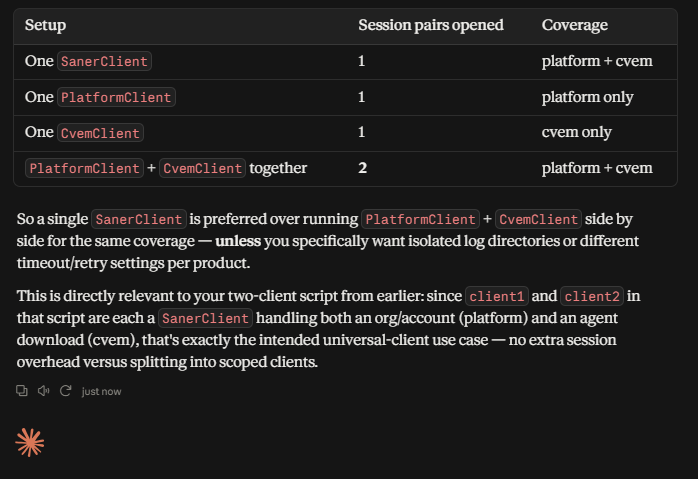
What are the different client types in the Saner SDK?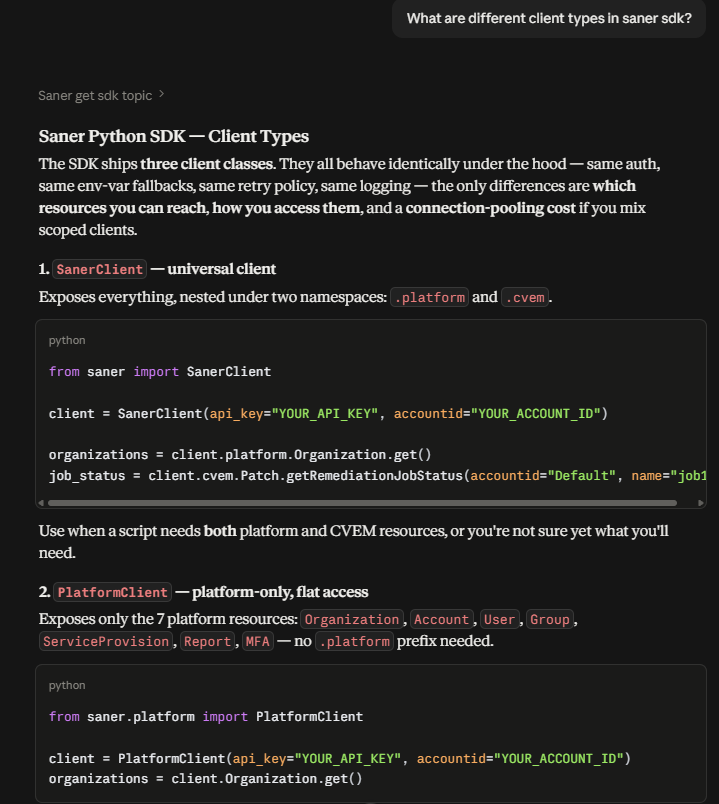
Generate a Multi-Step Automation Script
Your AI-powered tool can chain several APIs into a single script, working out the order and the parameters from the documentation.
Write me a Python script to first create an organization, create 2 accounts
under that organization, and download agents for both of those accounts.
Enable logging, and keep binary handling in mind.
The AI-powered tool identifies the APIs involved, determines the execution order, validates the parameters against the specification, and generates a working SDK script.
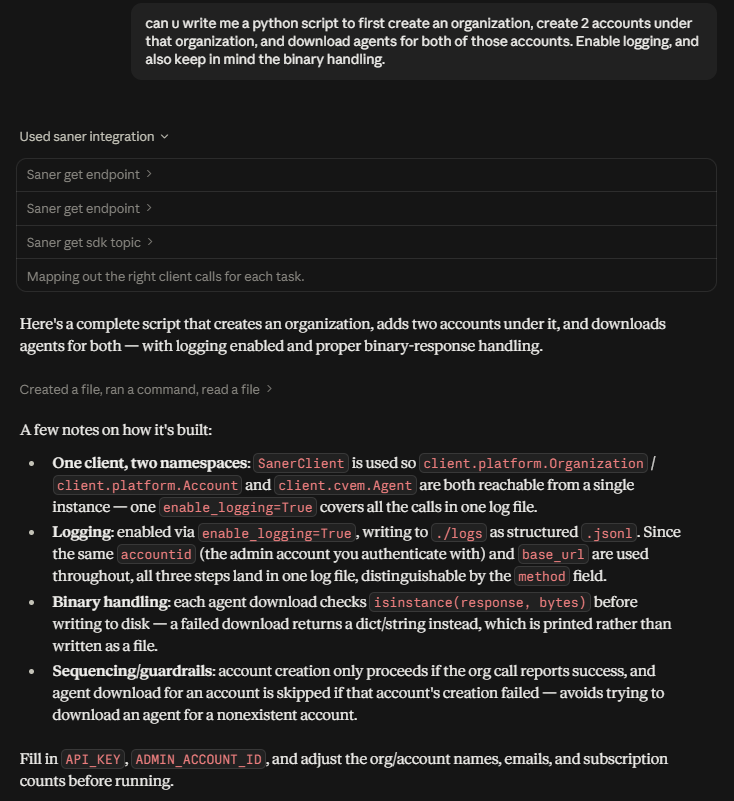
Example output — saner_setup.py
"""
Saner SDK automation script:

1. Create an Organization
2. Create 2 Accounts under that Organization
3. Download a Saner Agent for each of the 2 accounts

Logging is enabled (writes structured .jsonl logs to ./logs), and binary
responses (the agent installer downloads) are handled per SDK guidance:
always check `isinstance(response, bytes)` before writing to disk, since
a failure returns a dict/error instead of bytes.
"""

from saner import SanerClient

# ---------------------------------------------------------------------------
# Configuration - fill these in
# ---------------------------------------------------------------------------
API_KEY = "<YOUR_API_KEY>"
ADMIN_ACCOUNT_ID = "<YOUR_ADMIN_ACCOUNT_ID>"   # accountid used to authenticate/authorize the calls
BASE_URL = "https://saner.secpod.com"

ORG_NAME = "DemoOrg"
ORG_EMAIL = "[email protected]"
ORG_SUBSCRIPTIONS = "100"

ACCOUNTS = [
    {"name": "DemoAccount1", "email": "[email protected]", "numberofsubscriptions": "50"},
    {"name": "DemoAccount2", "email": "[email protected]", "numberofsubscriptions": "50"},
]

# Agent download settings (applied to both accounts)
AGENT_TYPE = "exe"          # osx, exe, rpm, dpkg, apk, all
AGENT_ARCHITECTURE = "x64"  # x86, x64, all


def is_success(response) -> bool:
    """
    Best-effort success check for the RPC-style responses these APIs
    return (a dict with a nested result list containing a status field).
    Adjust here if your SDK version surfaces this differently.
    """
    if not isinstance(response, dict):
        return False
    try:
        results = response["response"]["results"]["result"]
        return all(r.get("status", "").lower() in ("success",) for r in results)
    except (KeyError, TypeError):
        return False


def main():
    # Single universal client: SanerClient exposes both the platform
    # namespace (Organization, Account) and the cvem namespace (Agent),
    # so one client + one enable_logging=True covers everything below.
    client = SanerClient(
        api_key=API_KEY,
        accountid=ADMIN_ACCOUNT_ID,
        base_url=BASE_URL,
        enable_logging=True,
        log_dir="logs",
    )

    try:
        # -------------------------------------------------------------
        # Step 1: Create the organization
        # -------------------------------------------------------------
        print(f"Creating organization '{ORG_NAME}'...")
        org_response = client.platform.Organization.add(
            name=ORG_NAME,
            email=ORG_EMAIL,
            numberofsubscriptions=ORG_SUBSCRIPTIONS,
        )
        print("Organization response:", org_response)

        if not is_success(org_response):
            print("Organization creation failed or status unclear — stopping.")
            return

        # -------------------------------------------------------------
        # Step 2: Create 2 accounts under that organization
        # -------------------------------------------------------------
        created_accounts = []
        for acc in ACCOUNTS:
            print(f"Creating account '{acc['name']}' under '{ORG_NAME}'...")
            acc_response = client.platform.Account.add(
                name=acc["name"],
                organization=ORG_NAME,
                email=acc["email"],
                numberofsubscriptions=acc["numberofsubscriptions"],
            )
            print(f"Account '{acc['name']}' response:", acc_response)

            if is_success(acc_response):
                created_accounts.append(acc["name"])
            else:
                print(f"Account '{acc['name']}' creation failed or status unclear — skipping its agent download.")

        # -------------------------------------------------------------
        # Step 3: Download an agent for each successfully created account
        # -------------------------------------------------------------
        for account_name in created_accounts:
            print(f"Downloading agent for account '{account_name}'...")
            response = client.cvem.Agent.download(
                accountid=account_name,
                type=AGENT_TYPE,
                architecture=AGENT_ARCHITECTURE,
            )

            # Binary handling: the SDK returns bytes on success, and a
            # dict/str on failure. Always check before writing to disk.
            if isinstance(response, bytes):
                filename = f"Saner-Agent-{account_name}.zip"
                with open(filename, "wb") as f:
                    f.write(response)
                print(f"  Saved agent installer to {filename} ({len(response)} bytes)")
            else:
                print(f"  Agent download failed for '{account_name}':", response)

    finally:
        client.close()


if __name__ == "__main__":
    main()
Refine a Script Using SDK Capabilities
You can keep asking questions mid-task. Because the server carries SDK documentation as well as API specifications, your AI-powered tool can answer a design question and fold the answer straight into the script.
Actually I want to create 2 clients. Client 1 will create its own org and one
account under it, client 2 will do the same. Enable logging only for client 1,
and download agents respectively for them. Does the Saner SDK support
multi-client, or will I have to create separate files for the 2 clients?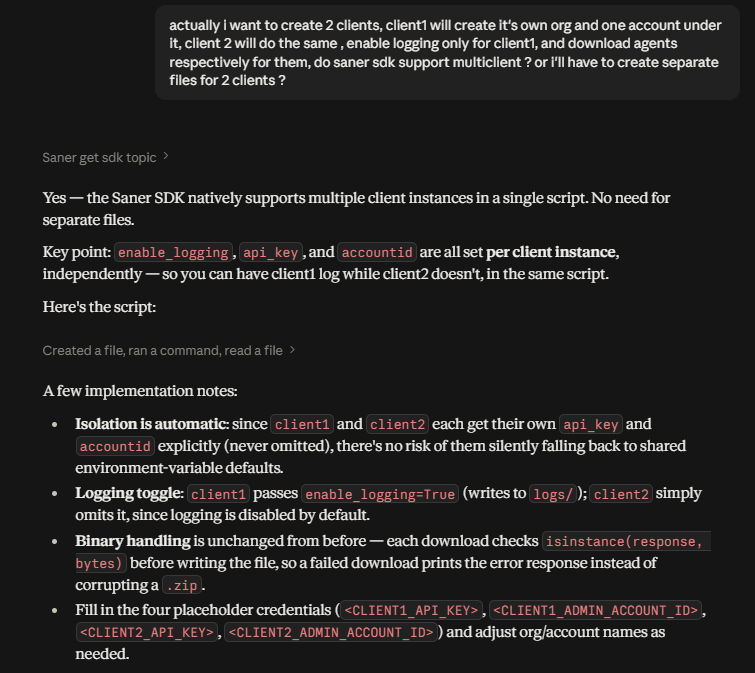
Example output — saner_multiclient_setup.py
"""
Saner SDK automation script using TWO independent client instances.

client1:
    - logging ENABLED
    - creates its own organization
    - creates one account under that organization
    - downloads an agent for that account

client2:
    - logging DISABLED
    - does the same, independently

The SDK supports multiple client instances natively (see "Multi Account
Usage" guide) - each maintains its own auth context, base_url, retry/timeout
config, and logging destination, so no cross-file separation is needed.

Binary handling: agent downloads return `bytes` on success and a dict/str
on failure - always check `isinstance(response, bytes)` before writing.
"""

from saner import SanerClient

BASE_URL = "https://saner.secpod.com"

AGENT_TYPE = "exe"          # osx, exe, rpm, dpkg, apk, all
AGENT_ARCHITECTURE = "x64"  # x86, x64, all


def is_success(response) -> bool:
    """Best-effort success check for RPC-style org/account responses."""
    if not isinstance(response, dict):
        return False
    try:
        results = response["response"]["results"]["result"]
        return all(r.get("status", "").lower() == "success" for r in results)
    except (KeyError, TypeError):
        return False


def run_client(client, org_name, org_email, account_name, account_email, subscriptions):
    """Create an org, create one account under it, download that account's agent."""

    print(f"[{account_name}] Creating organization '{org_name}'...")
    org_response = client.platform.Organization.add(
        name=org_name,
        email=org_email,
        numberofsubscriptions=subscriptions,
    )
    print(f"[{account_name}] Organization response:", org_response)

    if not is_success(org_response):
        print(f"[{account_name}] Organization creation failed or status unclear - stopping.")
        return

    print(f"[{account_name}] Creating account '{account_name}' under '{org_name}'...")
    acc_response = client.platform.Account.add(
        name=account_name,
        organization=org_name,
        email=account_email,
        numberofsubscriptions=subscriptions,
    )
    print(f"[{account_name}] Account response:", acc_response)

    if not is_success(acc_response):
        print(f"[{account_name}] Account creation failed or status unclear - skipping agent download.")
        return

    print(f"[{account_name}] Downloading agent...")
    response = client.cvem.Agent.download(
        accountid=account_name,
        type=AGENT_TYPE,
        architecture=AGENT_ARCHITECTURE,
    )

    # Binary handling - only write to disk if we actually got bytes back.
    if isinstance(response, bytes):
        filename = f"Saner-Agent-{account_name}.zip"
        with open(filename, "wb") as f:
            f.write(response)
        print(f"[{account_name}] Saved agent installer to {filename} ({len(response)} bytes)")
    else:
        print(f"[{account_name}] Agent download failed:", response)


def main():
    # -----------------------------------------------------------------
    # client1: logging ENABLED
    # -----------------------------------------------------------------
    client1 = SanerClient(
        api_key="<CLIENT1_API_KEY>",
        accountid="<CLIENT1_ADMIN_ACCOUNT_ID>",
        base_url=BASE_URL,
        enable_logging=True,
        log_dir="logs",
    )

    # -----------------------------------------------------------------
    # client2: logging DISABLED (default - omit enable_logging)
    # -----------------------------------------------------------------
    client2 = SanerClient(
        api_key="<CLIENT2_API_KEY>",
        accountid="<CLIENT2_ADMIN_ACCOUNT_ID>",
        base_url=BASE_URL,
    )

    try:
        run_client(
            client1,
            org_name="DemoOrg1",
            org_email="[email protected]",
            account_name="DemoAccount1",
            account_email="[email protected]",
            subscriptions="50",
        )

        run_client(
            client2,
            org_name="DemoOrg2",
            org_email="[email protected]",
            account_name="DemoAccount2",
            account_email="[email protected]",
            subscriptions="50",
        )
    finally:
        client1.close()
        client2.close()


if __name__ == "__main__":
    main()
Note:The scripts above are examples of AI-powered tool output, not maintained reference implementations. Generated code varies between runs and between tools. Always review it against the Python SDK documentation before running it.
Why This Helps
Working through the Saner API Docs MCP Server gives you automatic API discovery, parameter-aware code generation, multi-step workflow scripting, and documentation search without switching between documentation and code. For new developers, it also removes most of the ramp-up time spent learning where things live in the documentation.
Next Steps
- See Installation to install the Python SDK and run your first generated script
- See Multi-Account Usage for the multi-client pattern used above
Updated 11 days ago