
IDE Docstring Support
The Saner Python SDK includes rich inline docstrings for all client resources and methods. These docstrings are automatically displayed inside modern IDEs such as VS Code, PyCharm, and IntelliJ, helping developers understand API usage without switching to external documentation.
This improves development speed, reduces integration errors, and enables faster parameter discovery during implementation.
Inline Help While Calling Methods
When you hover over an SDK method, your IDE displays the full method description, usage details, and parameter documentation directly inside the editor.
Example, using PlatformClient (the same hover behavior applies identically on SanerClient's client.platform.Organization.get(...) and on CvemClient's resources; only the namespace prefix changes):
client.Organization.get(...)Hovering over get() shows:
- purpose of the method
- supported integration modes
- required parameters
- optional parameters
- the response shape, field by field
- the errors the endpoint can return
- a sample response payload
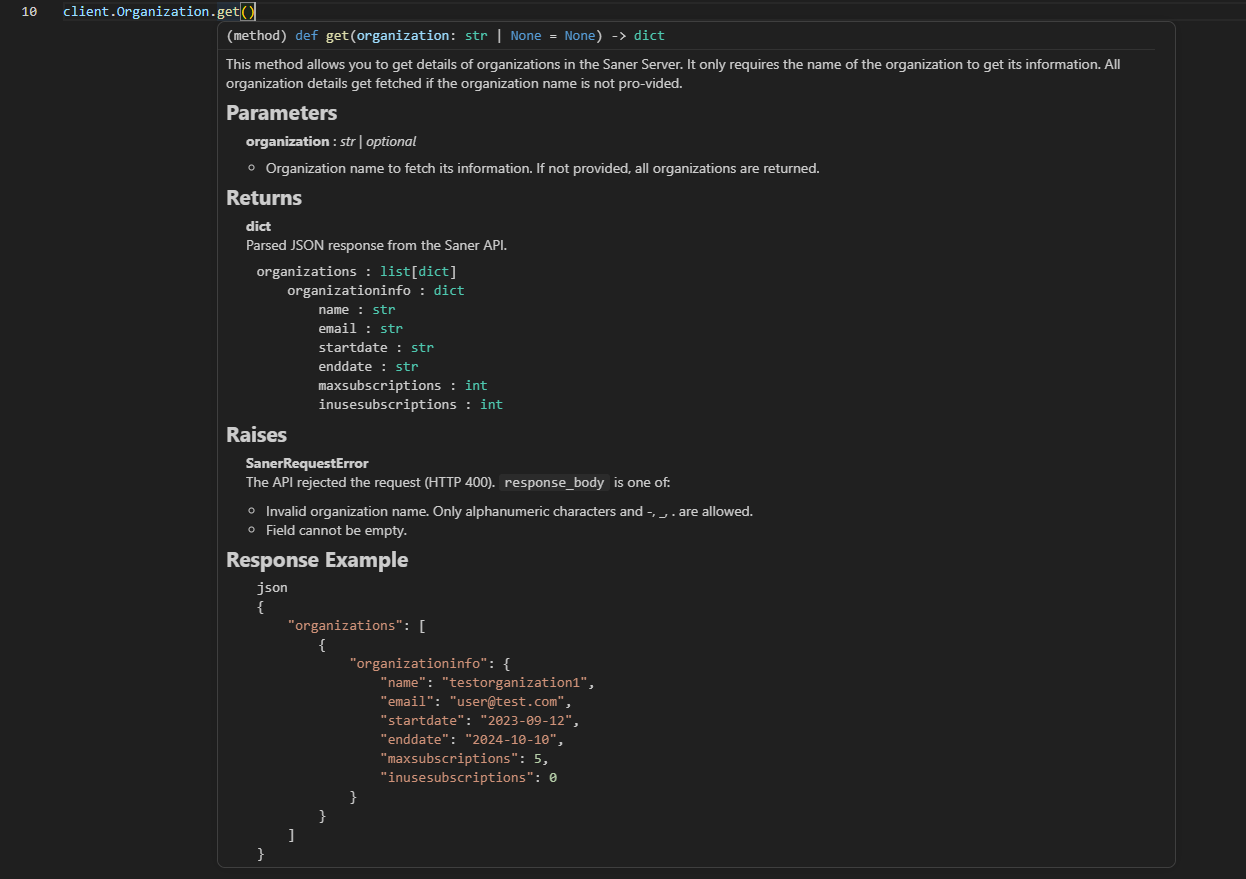
This allows developers to understand endpoint behavior without leaving their code environment.
Response Documentation
Every method that has a published API specification documents its response
inline, so you can see what comes back without calling the endpoint first.
Three sections appear below the parameters:
- Returns names the response fields and their types, nested to match the
real payload structure, with a short description of each field where the API
reference provides one. - Raises lists the error messages the endpoint can answer with. A rejected
request raisesSanerRequestError, and these are the values you will find on
itsresponse_bodyattribute. See the "Error Handling Model" guide for the
full exception hierarchy. - Response Example shows a sample payload.
Example, hovering client.platform.Organization.get(...):
Returns
-------
dict
    Parsed JSON response from the Saner API.

```
organizations : list[dict]
    organizationinfo : dict
        name : str
        email : str
        startdate : str
        enddate : str
        maxsubscriptions : int
        inusesubscriptions : int
```

Raises
------
SanerRequestError
    The API rejected the request (HTTP 400). ``response_body`` is one of:
    - Invalid organization name. Only alphanumeric characters and -, _, . are
      allowed.
    - Field <key> cannot be empty.

Response Example
----------------
```json
{
    "organizations": [
        {
            "organizationinfo": {
                "name": "testorganization1",
                "email": "[email protected]",
                "startdate": "2023-09-12",
                "enddate": "2024-10-10",
                "maxsubscriptions": 5,
                "inusesubscriptions": 0
            }
        }
    ]
}
```
Two things worth knowing when you read these:
- Example payloads are illustrative rather than exhaustive. Long arrays are
shortened and very large payloads are truncated, with a note where that
happens. An example labelled "Illustrative payload assembled from per-field
examples" is built from the documented value of each field individually, so
it shows realistic values but is not a single captured response. - For endpoints that return a file, such as agent downloads and PDF reports,
the return type isbytes | dict. You getbytesfor the file itself, or a
parsed dict if the server answers with JSON instead. The Response Example
section shows how to handle both. See the "Handling Binary Responses" guide.
These sections are generated from the same API specifications that produce the
API reference portal, and the SDK's test suite checks them for drift, so the
inline documentation and the published reference stay in step.
Parameter-Level Documentation
When hovering over individual parameters, the IDE displays parameter-specific descriptions extracted from the SDK docstring.
Example:
client.Organization.get(
    organization="ExampleOrg",
)
Hovering over parameters such as:
organizationshows their expected values and usage context.

Screenshot: Hovering over a parameter inside VS Code
This makes it easier to supply correct values during development.
Autocomplete Support
The SDK provides full autocomplete support for:
- resource modules
- API methods
- parameter names
- optional arguments
What the dropdown shows depends on which client class you're using. See the "Client Types" guide for the full picture of the three classes.
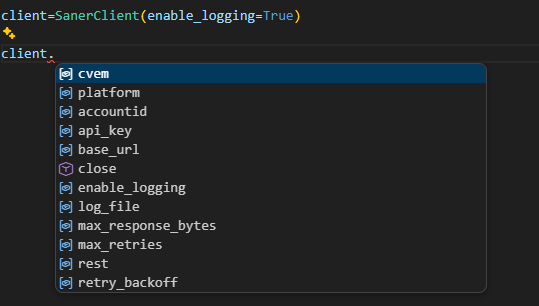
On SanerClient (universal, nested)
Typing:
client.Displays the two product namespaces alongside the client's own config/transport attributes and methods, not the 20 resources directly:
platform
cvem
rpc
rest
close
api_key
timeout
...
Selecting a namespace narrows it further:
client.platform.Organization
Account
User
Group
ServiceProvision
Report
MFA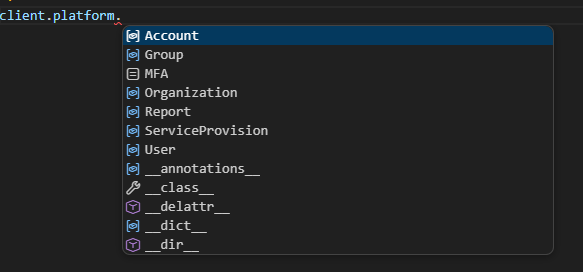
client.cvem.Agent
Device
CyberHygiene
PostureAnomaly
AssetExposure
Vulnerability
Compliance
RiskPrioritization
Patch
Endpoint
AD
NetworkScanner
Configuration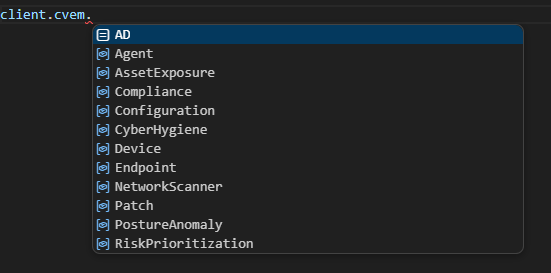
On PlatformClient / CvemClient (scoped, flat)
Typing client. on a PlatformClient or CvemClient instance goes straight to that product's resources, with no intermediate namespace step; this is the flatter alternative mentioned in the "Client Types" guide:
client.Organization
Account
User
Group
ServiceProvision
Report
MFA(shown for PlatformClient; a CvemClient instance would list the 13 cvem resources instead)
Selecting a resource then shows its methods, identically across all three client classes:
client.Organization.Displays available methods inside that resource automatically.
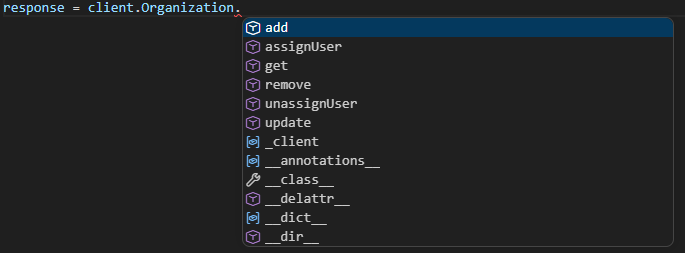
This significantly reduces the need to manually reference documentation.
Note: This autocomplete accuracy relies on type information the SDK declares explicitly for its dynamically-attached resources (bare class-level annotations on small internal namespace classes). It isn't automatic just because the attributes exist at runtime. If a future resource is ever added without its matching annotation, it will still work at runtime but silently disappear from autocomplete, so this is a detail worth knowing if you're tracking down why a newly-added resource isn't suggested yet.
Parameter Discovery During Development
Each SDK method includes structured parameter definitions directly in the docstring.
Example method, using CvemClient (AD is a cvem resource; on SanerClient this would be client.cvem.AD.addConfig(...)):
client.AD.addConfig(...)Provides inline details such as:
- required parameters
- optional parameters
- expected value formats
- default behaviors
- scheduling configuration rules
- SSL usage requirements
This enables developers to:
- understand required inputs instantly
- avoid invalid parameter combinations
- reduce trial-and-error debugging
- integrate faster with fewer mistakes

Example: Docstring-Driven Development Workflow
Typical developer workflow using SDK docstrings, shown here on CvemClient:
- Type resource name
client.AD.- Select method from autocomplete
client.AD.addConfig(...)-
Hover method name to read integration description
-
Hover parameters to inspect expected values
-
Execute request confidently
No external documentation lookup required.
Benefits of IDE Docstring Integration
Inline SDK documentation improves developer productivity by providing:
- real-time usage guidance
- parameter validation awareness
- autocomplete-assisted discovery
- reduced documentation switching
- faster onboarding for new users
- fewer integration mistakes
This creates a smoother and more efficient development experience when working with Saner APIs.
Updated about 2 months ago